import matplotlib
if not hasattr(matplotlib.RcParams, "_get"):
    matplotlib.RcParams._get = dict.get
15.4 Semantic compression#
Musical sound (acoustic, continuous, and dense) may be underpinned by a score (discrete, symbolic, and sparse). A few minutes of uncompressed audio take tens of megabytes, while a score of the same music may take just a few kilobytes.
The idea of semantic compression is to achieve extreme levels of compression by retaining the semantically meaningful information, and discarding the rest. For example, for speech, the coder could transcribe audio into text, store the text, and then the decoder could synthesize the text back into speech. If you don’t care about the acoustics of the speech (the speaker’s voice, the room it was recorded in), this is perfectly reasonable.
Similarly, for music, the coder could transcribe audio into a score, store the score, and the decoder could synthesize the score into audio:
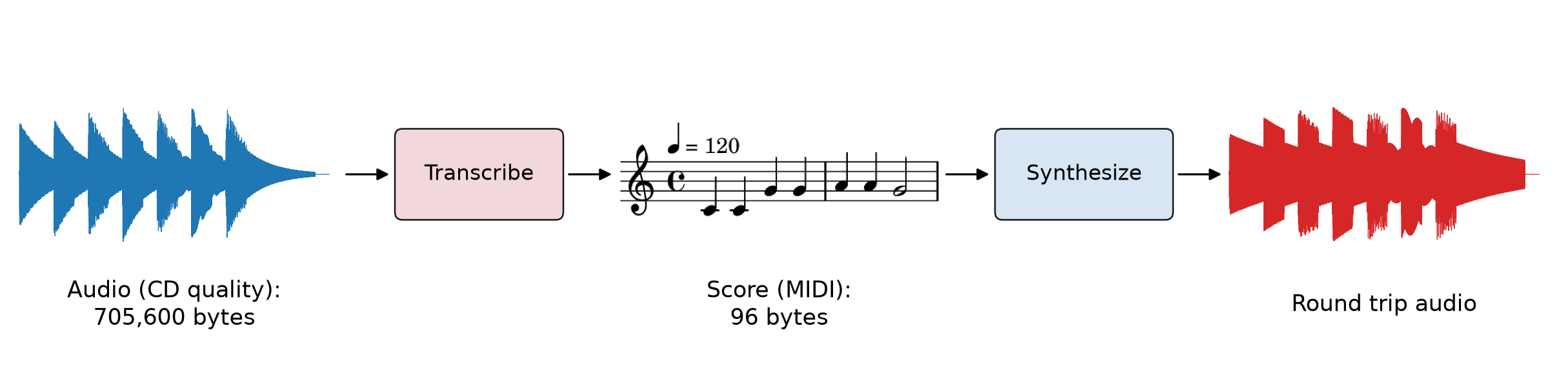
Fig. 129 Semantic compression of the first phrase of Twinkle, Twinkle, Little Star (\(4\) seconds). The round trip preserves the notes, but not the sound of the original instrument.#
In terms of rate and distortion, semantic codecs achieve tiny rates, at the cost of a distortion that preserves only the score. For example, suppose that a pianist plays \(5\) notes per second, and we store each note as two events, one when it starts and one when it ends, each taking \(3\) bytes (as we will see in the MIDI format). That is a rate of
a compression factor of \(\frac{1{,}411{,}200}{240} = 5880\times\) relative to CD-quality audio.
Music transcription is a challenging problem, which we will explore briefly in Chapter 16. In this section, we focus on a different question: how should we store musical scores digitally, regardless of if our goal is compression or control of real-time synthesis?
Real-time scores#
So far in this book, we have represented scores in Pyquist as a pq.Score, a list of pq.Events, each of which is a pair of a time and a dict of keyword arguments. For example, here is the first phrase of Twinkle, Twinkle, Little Star, from Chapter 4:
melody = pq.Score([
    (0.0, {"pitch": 60, "duration": 0.5}),
    (0.5, {"pitch": 60, "duration": 0.5}),
    (1.0, {"pitch": 67, "duration": 0.5}),
    (1.5, {"pitch": 67, "duration": 0.5}),
    (2.0, {"pitch": 69, "duration": 0.5}),
    (2.5, {"pitch": 69, "duration": 0.5}),
    (3.0, {"pitch": 67, "duration": 1.0}),
])
Each event describes an entire note, including its duration. This works well for a score written in advance. But what if we wanted to transmit a score in real time, for example, from a keyboard to a synthesizer while a musician plays it? When a key is pressed, we don’t yet know how long it will be held. So instead, a real-time score describes the onset and offset of each note as separate events:
melody_realtime = pq.Score([
    (0.0, {"mtype": "note_on", "note": 60, "velocity": 100}),
    (0.5, {"mtype": "note_off", "note": 60, "velocity": 0}),
    (0.5, {"mtype": "note_on", "note": 60, "velocity": 100}),
    (1.0, {"mtype": "note_off", "note": 60, "velocity": 0}),
    (1.0, {"mtype": "note_on", "note": 67, "velocity": 100}),
    # ...
    (4.0, {"mtype": "note_off", "note": 67, "velocity": 0}),
])
A synthesizer can start a note as soon as it receives a note_on event, and stop it when it receives the matching note_off event. The velocity describes how hard the key was struck, which usually controls loudness. This is exactly the representation used by MIDI. In fact, it is what pq.Score.from_midi returns when we pass as_notes=False.
MIDI#
How do we compactly encode these events? The MIDI (Musical Instrument Digital Interface) standard, published in 1983, answers this question. MIDI was developed by Dave Smith of Sequential Circuits and Ikutaro Kakehashi of Roland, along with other synthesizer manufacturers, so that keyboards, synthesizers, drum machines, and computers from different companies could control one another in real time. Remarkably, it remains the industry standard today, in synthesizers, digital audio workstations, live music, and music research.
Important
MIDI does not transmit audio. It transmits messages, instructions like “start playing C4”, and leaves the synthesis of audio to the receiving device.
Most MIDI messages are \(2\) or \(3\) bytes long: a status byte, which says what kind of message it is, followed by one or two data bytes. To tell them apart, the most significant bit of a status byte is always \(1\), and the most significant bit of a data byte is always \(0\). So each data byte carries a \(7\)-bit value, from \(0\) to \(127\). This is why MIDI pitches and velocities range from \(0\) to \(127\). For example, here is a Note On message for C4 (pitch \(60\)) with velocity \(100\):
Status |
Data 1 |
Data 2 |
|
|---|---|---|---|
Binary |
\(\texttt{1001}\;\texttt{0000}\) |
\(\texttt{0011}\;\texttt{1100}\) |
\(\texttt{0110}\;\texttt{0100}\) |
Meaning |
Note On, channel \(1\) |
pitch \(60\) |
velocity \(100\) |
The status byte has the form \(\texttt{1TTT}\;\texttt{CCCC}\). The three bits \(\texttt{TTT}\) select one of \(8\) types: for example, \(\texttt{000}\) is Note Off, \(\texttt{001}\) is Note On, \(\texttt{011}\) is Control Change (for knobs, sliders, and pedals), \(\texttt{100}\) is Program Change (for choosing instruments), and \(\texttt{111}\) is reserved for system messages. The four bits \(\texttt{CCCC}\) select one of \(16\) channels. A single MIDI connection can carry \(16\) independent streams of messages, for example, a different instrument on each channel. (Channels are conventionally numbered \(1\) to \(16\), but encoded as \(0\) to \(15\).)
How many bytes does a note take? A Note On message and a Note Off message, \(3\) bytes each, so \(6\) bytes per note.
Standard MIDI files. Messages can be sent in real time, or stored on disk in a standard MIDI file (.mid). A MIDI file stores a list of messages, each with a timestamp in ticks, an integer subdivision of a beat (for example, \(480\) ticks per beat). A separate tempo message maps beats to seconds. This is a lot like a Pyquist score. In a MIDI file, a note is two messages (Note On and Note Off) with their own timestamps, so its duration in ticks is the difference between them. As a MIDI file, the first phrase of our melody takes just \(87\) bytes, for \(4\) seconds of music. That is a rate of about \(174\) bits per second, a “compression factor” of roughly \(8000\times\) relative to CD-quality audio!
Working with MIDI files in Pyquist. pq.Score.from_midi reads a MIDI file, and pairs up each Note On message with its Note Off message. It returns a score with one event per note, along with a metronome that converts ticks to seconds. Each event’s keyword arguments describe its note:
pitchandvelocity, from \(0\) to \(127\).duration, in seconds, andduration_ticks, in ticks.channel, from \(0\) to \(15\) (so channel \(1\) is0).programandis_drum, which describe the instrument.
Programs. Since MIDI doesn’t transmit audio, how does a synthesizer know which instrument to play? A Program Change message selects a program (an instrument sound) for a channel, from \(0\) to \(127\). The General MIDI standard (1991) assigns a fixed instrument to each program. For example, program \(0\) is an acoustic grand piano, \(32\) is an acoustic bass, and \(40\) is a violin. By convention, channel \(10\) is reserved for drums, where each pitch selects a different drum, for example, \(36\) for a kick drum and \(38\) for a snare drum. Pyquist copies the current program of each note’s channel into its program, and sets is_drum for notes on channel \(10\). An instrument can use these to decide how to render each note.
Control changes. Control Change messages carry a controller number and a value, from \(0\) to \(127\) each. For example, controller \(64\) is the sustain pedal of a piano (values of \(64\) or more mean the pedal is down), and controller \(7\) is the volume of a channel. With all_events=True, pq.Score.from_midi also returns these messages as events, whose mtype is "control_change", along with every other kind of message.
The code below loads a short MIDI file with three instruments, prints its first few events and its programs, renders it with an instrument that depends on each note’s program, and then finds the file’s sustain pedal messages:
score, metronome = pq.Score.from_midi("./assets/twinkle-band.mid")
print(f"{len(score)} notes, {metronome.tick_to_seconds(score.end_time):.1f} seconds")
for time, kwargs in score[:4]:
    print(time, kwargs)

# Which instruments does this file use? (MIDI numbers programs from 0)
GM_NAMES = {0: "Acoustic Grand Piano", 32: "Acoustic Bass"}
for channel, program, is_drum in sorted({(kw["channel"], kw["program"], kw["is_drum"])
                                         for _, kw in score}):
    name = "Drum Kit" if is_drum else GM_NAMES.get(program, "?")
    print(f"channel {channel + 1}: program {program} ({name})")
70 notes, 7.8 seconds
0 {'mtype': 'note', 'duration': 0.0625, 'duration_ticks': 60, 'pitch': 42, 'velocity': 70, 'program': 0, 'is_drum': True, 'channel': 9}
0 {'mtype': 'note', 'duration': 0.0625, 'duration_ticks': 60, 'pitch': 36, 'velocity': 70, 'program': 0, 'is_drum': True, 'channel': 9}
0 {'mtype': 'note', 'duration': 0.4895833333333333, 'duration_ticks': 470, 'pitch': 60, 'velocity': 90, 'program': 0, 'is_drum': False, 'channel': 0}
0 {'mtype': 'note', 'duration': 0.9791666666666666, 'duration_ticks': 940, 'pitch': 48, 'velocity': 80, 'program': 32, 'is_drum': False, 'channel': 1}
channel 1: program 0 (Acoustic Grand Piano)
channel 2: program 32 (Acoustic Bass)
channel 10: program 0 (Drum Kit)
def instrument(pitch: int, duration: float, velocity: int, program: int, is_drum: bool,
               **kwargs) -> pq.Audio:
    """Dispatch each note to a synthesizer, based on its MIDI program."""
    if is_drum:
        return drum(pitch, velocity)
    if 32 <= program <= 39:  # programs 32 to 39 are the General MIDI basses
        return bass(pitch, duration, velocity)
    return piano(pitch, duration, velocity)


pq.play(score.render(instrument, metronome=metronome), normalize=True)
# all_events=True also returns the messages that aren't notes
events, metronome = pq.Score.from_midi("./assets/twinkle-band.mid", all_events=True)
print(sorted({kwargs["mtype"] for _, kwargs in events}))

for time, kwargs in events:
    if kwargs["mtype"] == "control_change" and kwargs["control"] == 64:
        state = "down" if kwargs["value"] >= 64 else "up"
        print(f"{metronome.tick_to_seconds(time):.2f} s: sustain pedal {state} "
              f"(channel {kwargs['channel'] + 1})")
['control_change', 'end_of_track', 'note', 'program_change', 'set_tempo']
0.01 s: sustain pedal down (channel 1)
1.99 s: sustain pedal up (channel 1)
2.01 s: sustain pedal down (channel 1)
3.99 s: sustain pedal up (channel 1)
4.01 s: sustain pedal down (channel 1)
5.99 s: sustain pedal up (channel 1)
6.01 s: sustain pedal down (channel 1)
7.99 s: sustain pedal up (channel 1)
Other score formats#
MIDI captures both scores and expressive performances, since its messages can record exactly when and how hard a musician played each note. But it doesn’t capture many aspects of music notation, such as how notes are spelled (C♯ vs. D♭), or how they are grouped into measures. Many other score formats exist for these purposes. Here is our melody in three of them:
ABC notation is a compact text format, popular for folk tunes:
X:1
T:Twinkle, Twinkle, Little Star
M:4/4
L:1/4
Q:1/4=120
K:C
C C G G | A A G2 |]
LilyPond is a text-based language for engraving beautiful sheet music:
\relative c' {
  \time 4/4
  \tempo 4 = 120
  c4 c g' g | a a g2 \bar "|."
}
MusicXML is a verbose XML format for exchanging scores between notation software:
<score-partwise version="4.0">
  <part-list>
    <score-part id="P1"><part-name>Melody</part-name></score-part>
  </part-list>
  <part id="P1">
    <measure number="1">
      <attributes>
        <divisions>1</divisions>
        <key><fifths>0</fifths></key>
        <time><beats>4</beats><beat-type>4</beat-type></time>
        <clef><sign>G</sign><line>2</line></clef>
      </attributes>
      <note>
        <pitch><step>C</step><octave>4</octave></pitch>
        <duration>1</duration>
        <type>quarter</type>
      </note>
      <!-- ... C4, G4, and G4 ... -->
    </measure>
    <measure number="2">
      <!-- ... A4, A4, and a half note G4 ... -->
    </measure>
  </part>
</score-partwise>
At a high level, these formats capture a score, while MIDI captures both scores and expressive performances.