import matplotlib
if not hasattr(matplotlib.RcParams, "_get"):
matplotlib.RcParams._get = dict.get
13.6 Dynamic range compression#
Many recordings have a wide dynamic range, from quiet passages to loud ones. A compressor reduces this range, by turning down the loud passages relative to the quiet ones. Compression is useful for numerous scenarios, e.g., keeping a vocal at a consistent level within a mix, making music consistently audible over the noise of a car, or helping broadcasts maintain a steady loudness:
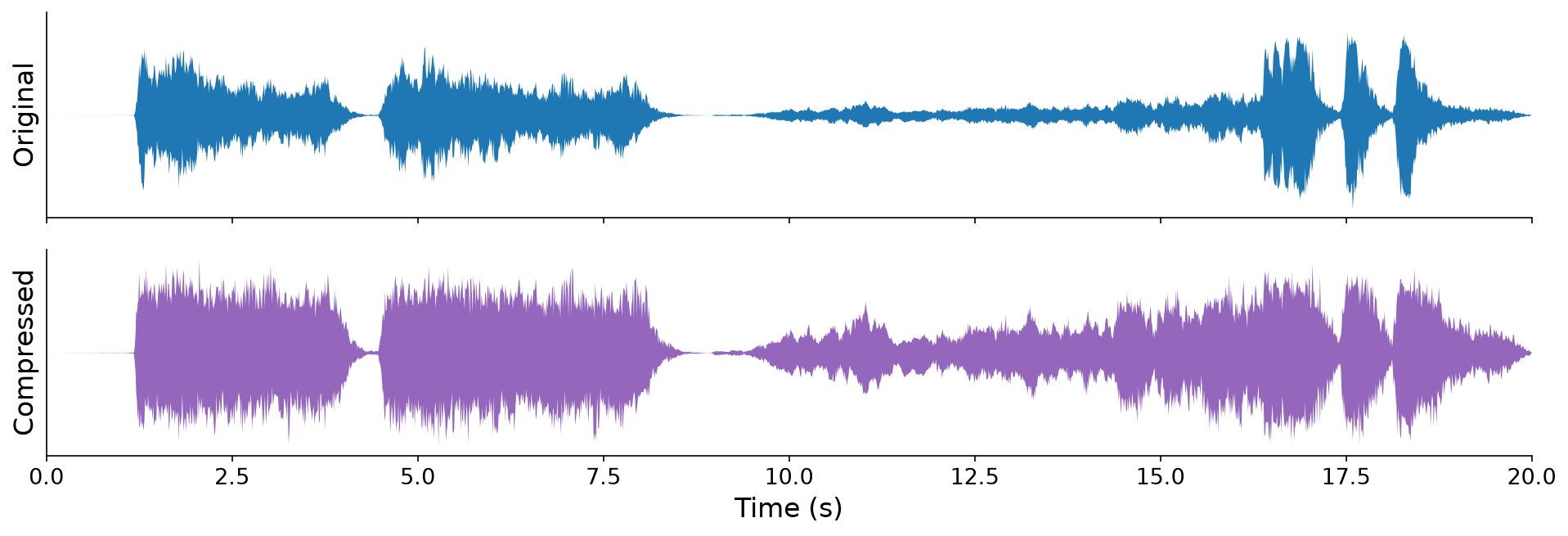
Fig. 106 The opening of Beethoven’s Fifth Symphony, before (top) and after (bottom) compression, scaled to the same peak amplitude. Compression shrinks the gap between its loud and quiet passages.#
To decide how much to turn a sound down, a compressor must first measure how loud the sound is.
Loudness and RMS amplitude#
How loud a sound seems has only a fuzzy relationship to its amplitude. In particular, peak amplitude is a poor predictor of loudness. For example, several sounds can share the same peak amplitude, but they may differ dramatically in perceived loudness:
Three sounds, all with the same peak amplitude of \(-30\) dBFS: a single click, a sinusoid, and white noise whose samples are each randomly either the positive or the negative peak amplitude.
A better proxy for loudness is the RMS amplitude, which measures the typical size of a signal’s samples over time:
Definition 41 (RMS amplitude)
The root-mean-square (RMS) amplitude of a signal \(\mathbf{x} = [x[0], \ldots, x[N - 1]]\) is
For example, consider the three sounds above, each with a peak amplitude of \(A\). The click is \(0\) everywhere except for a single sample, so over \(N\) samples, its RMS amplitude is only \(\frac{A}{\sqrt{N}}\), nearly \(0\). The RMS amplitude of the sinusoid is \(\frac{A}{\sqrt{2}} \approx 0.707 A\). And every sample of the noise is \(\pm A\), so its RMS amplitude is exactly \(A\). These RMS amplitudes follow the same order as the loudness of the sounds:
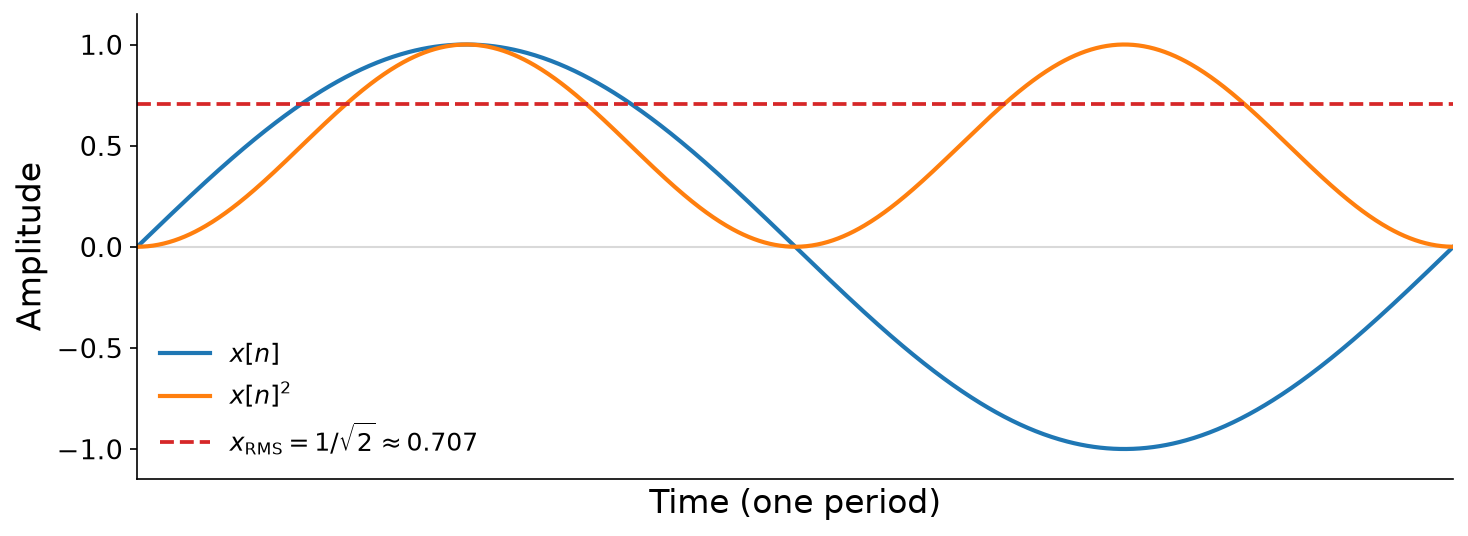
Fig. 107 A sinusoid \(x[n]\) (blue), its square \(x[n]^2\) (orange), and its RMS amplitude, \(\frac{1}{\sqrt{2}}\) (red). The RMS amplitude is the square root of the average of the orange curve.#
To track loudness over time, we compute the RMS amplitude of each frame of a signal, as in Chapter 10. For example, to measure the loudness \(100\) times per second at \(f_s = 44{,}100\) Hz, we need a hop length of
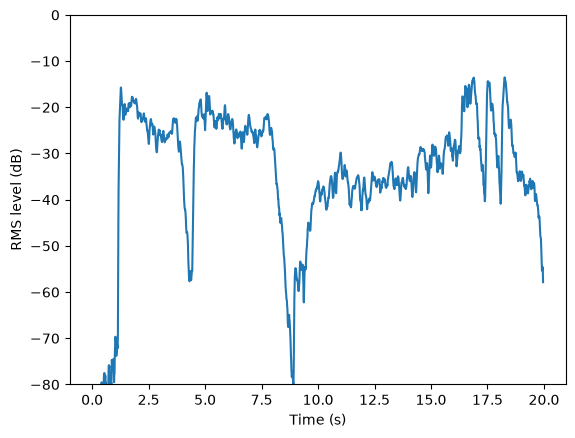
The code below computes the RMS amplitudes of the click, the sinusoid, and the noise. Then it uses the frames of Chapter 10 to compute the RMS level of the opening of Beethoven’s Fifth Symphony, in decibels, over time:
def rms(x: np.ndarray) -> float:
"""The root-mean-square amplitude of x."""
return np.sqrt(np.mean(x ** 2))
def rms_envelope(audio: pq.Audio, N_H: int, N_F: int) -> np.ndarray:
"""The RMS amplitude of each frame of the audio (Chapter 10)."""
return np.array([rms(frame) for frame in iter_frames(audio, N_H, N_F)])
f_s = 44100
n = np.arange(f_s)
peak = pq.helper.db_to_amplitude(-30.0) # a gentle peak amplitude
click = np.zeros(f_s)
click[0] = peak
sine = peak * np.sin(2 * np.pi * 440 * n / f_s)
noise = peak * np.random.choice([-1.0, 1.0], f_s) # white noise: each sample is -peak or peak
for name, x in [("click", click), ("sine", sine), ("noise", noise)]:
print(f"{name}: peak {np.abs(x).max():.4f}, RMS {rms(x):.4f}")
pq.play(pq.Audio(x, f_s))
beethoven = pq.Audio.from_file("./assets/beethoven.wav")
pq.play(beethoven, normalize=True)
N_H = beethoven.sample_rate // 100 # 100 frames per second
level_db = pq.helper.amplitude_to_db(np.maximum(rms_envelope(beethoven, N_H, 4 * N_H), 1e-6))
plt.plot(np.arange(len(level_db)) * N_H / beethoven.sample_rate, level_db)
plt.xlabel("Time (s)")
plt.ylabel("RMS level (dB)")
plt.ylim(-80, 0)
plt.show()
click: peak 0.0316, RMS 0.0002
sine: peak 0.0316, RMS 0.0224
noise: peak 0.0316, RMS 0.0316
Compression#
A compressor multiplies each sample by a gain that depends on the loudness around it:
where the RMS is measured over a window of radius \(M\) samples, and \(\text{map} : \mathbb{R} \to \mathbb{R}\) turns a measured RMS into a gain factor. Compared to the filters of Chapter 9, this filter is unusual in two ways. First, it is non-linear, because of both the RMS and the map. Second, it is non-causal: it looks ahead in time, to \(x[n + M]\). To compress in real time, we can simply delay the output by \(M\) samples, so the compressor only looks at samples it has already seen: \(y[n] = x[n - M] \cdot \text{map}\big(\text{RMS}(x[n - 2M], \ldots, x[n])\big)\).
The map is usually designed in decibels, with two parameters: a threshold \(T\) and a ratio \(R \geq 1\). Levels below the threshold pass through unchanged. Above the threshold, every \(R\) dB of increase in the input level produces only \(1\) dB of increase in the output level:
The gain applied to the signal is then \(L_\text{out} - L_\text{in}\) dB. A ratio of \(R = 1\) leaves the sound unchanged, while a ratio of \(R = \infty\) never lets the level exceed the threshold, an extreme form of compression called limiting. Some compressors also boost quiet sounds, with a second, lower threshold, below which the level is pulled up toward the threshold. This upward compression also shrinks the dynamic range. Its opposite, expansion, pushes quiet sounds even quieter, which widens the dynamic range:
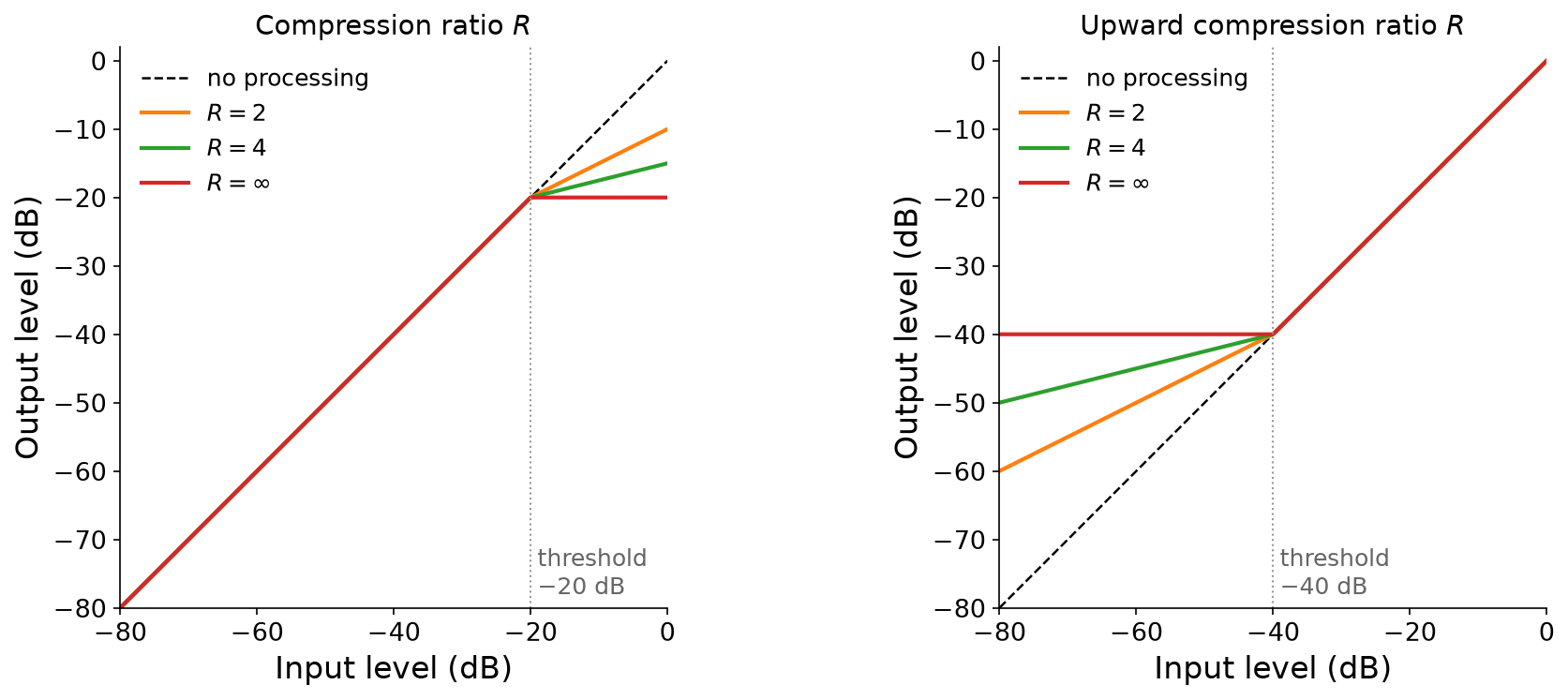
Fig. 108 Static curves of a compressor, mapping input levels to output levels. Left: compression above a threshold of \(-20\) dB, for several ratios \(R\). Right: upward compression below a threshold of \(-40\) dB.#
The code below compresses the opening of Beethoven’s Fifth Symphony with a threshold of \(-30\) dB and a ratio of \(4\). Compression turns the loud passages down, so the code then normalizes the output to restore its peak level, which brings the quiet passages up. Engineers call this restoring gain makeup gain:
def compress(audio: pq.Audio, threshold_db: float, ratio: float,
key: pq.Audio | None = None) -> pq.Audio:
"""Turn the audio down wherever the level of `key` (the audio itself, by
default) exceeds the threshold, so the level above the threshold shrinks by `ratio`."""
key = audio if key is None else key
N_H = key.sample_rate // 100 # 100 frames per second
N_F = 4 * N_H
level_db = pq.helper.amplitude_to_db(np.maximum(rms_envelope(key, N_H, N_F), 1e-6))
target_db = np.where(level_db > threshold_db,
threshold_db + (level_db - threshold_db) / ratio, level_db)
gain = pq.helper.db_to_amplitude(target_db - level_db) # one gain per frame...
centers = N_H * np.arange(len(gain)) + N_F // 2 # ...at the center of each frame...
gain = np.interp(np.arange(len(audio)), centers, gain) # ...interpolated to every sample
return pq.Audio(audio.samples * gain[:, np.newaxis], audio.sample_rate)
beethoven = pq.Audio.from_file("./assets/beethoven.wav")
compressed = compress(beethoven, threshold_db=-30.0, ratio=4.0)
pq.play(beethoven, normalize=True)
pq.play(compressed, normalize=True) # normalizing restores the peak level
Recording: Ludwig van Beethoven, Symphony No. 5, performed by Arturo Toscanini and the NBC Symphony Orchestra (1939), from the Internet Archive, public domain.
Side-chain compression#
Our compressor measured the loudness of the same signal that it turns down. But it can just as well measure the loudness of a different signal, called the key or the side chain. This is side-chain compression. For example, radio stations use it to “duck” the music whenever a host speaks, and dance music producers use it to duck a whole mix whenever the kick drum hits, which makes the music pump rhythmically with the beat.
Our compress function accepts an optional key for exactly this purpose. The code below uses a kick drum as the key to compress a synthesizer pad, and then mixes the two:
pad = pq.Audio.from_file("./assets/pad.wav")
kick = pq.Audio.from_file("./assets/kick-loop.wav")
N = min(len(pad), len(kick))
pad, kick = 0.5 * pad[:N], kick[:N]
ducked = compress(pad, threshold_db=-40.0, ratio=10.0, key=kick) # the kick turns the pad down
pq.play(pad + kick, normalize=True)
pq.play(ducked + kick, normalize=True)
Sounds from Freesound: kick drum 102888 by Uknow Dude, License: CC0. Pad 37746 by Quilt, License: CC0.