Direction 2 (Technical): Implement a DX7 synthesizer#
The DX7 is a famous FM synthesizer made by Yamaha in the 1980s. It defines 32 algorithms that route 6 operators (sinusoidal oscillators with envelopes) in different configurations. Even with a fixed routin configurations, the timbre space is enormous: changing frequency ratios, modulation depths, and envelopes produces everything from electric pianos and brass to metallic bells and otherworldly textures.
In this direction, you will implement a DX7-style synthesizer from scratch: an operator primitive, two algorithms that each wire 6 operators together, two presets that produce meaningfully different timbres, and a meta-instrument that can sonify a MIDI file.
Steps#
There is no starter code for this assignment. Structure your implementation however you prefer, as long as it conforms to the requirements below.
Implement an Operator. Write a function that represents a single DX7 operator. See the Operator Interface section below for the mathematical definition and required type signature.
Wire up two algorithms. Pick two of the 32 DX7 algorithms (see the diagram below) and implement each by connecting 6 instances of your Operator according to the routing pattern. Avoid algorithms 4 and 6, which involve cross-operator feedback and are more complex to implement correctly.
Define two presets. Each preset uses one of your two algorithms with a specific set of operator parameters (frequency ratios, output levels, envelopes) to produce a distinctive sound. Wrap each preset as an instrument function:
def dx7_preset1(pitch: int, velocity: int, duration: float) -> pq.Audio
def dx7_preset2(pitch: int, velocity: int, duration: float) -> pq.Audio
where
pitchis a MIDI note number,velocityis a MIDI velocity (0-127), anddurationis in seconds. The two presets should produce meaningfully different timbres, not just the same sound at different volumes or pitches.Render single-note demos. Produce
preset1.wavandpreset2.wav(each a single note demonstrating the preset’s timbre).Sonify a MIDI file. Find a MIDI file of interest from BitMIDI. Define a meta-instrument function
midi_to_dx7that routes different MIDI program codes (instruments) to your two presets. Use it to render the MIDI score and producesong.wav:midi_score, midi_metronome = pq.midi_to_score("your_file.mid") song = midi_score.render(midi_to_dx7, midi_metronome)
Your
song.wavshould be at most 60 seconds long. If the MIDI file is longer, trim the score or select a portion before rendering.
Operator Interface#
A DX7 operator uses phase modulation (the integrated form of frequency modulation). Your operator function must implement the following equation:
where \(N = \lfloor \text{duration} \cdot f_s \rfloor\) is the number of output samples and:
ampis the output amplitude. For modulators, this is the peak phase deviation in radians.envis the amplitude envelope, a 1-D array of length \(N\).f_cis the carrier frequency in Hz.modis the phase modulation input from another operator in radians, a 1-D array of length \(N\). Pass zeros when there is no modulation input.feedbackis the feedback scaling factor (0.0 when no feedback).\(y[n-1]\) is this operator’s own previous output sample (0 for the first sample).
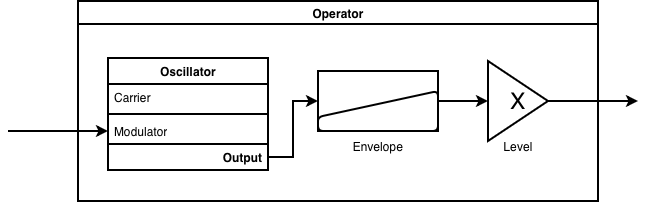
Implement the operator as a function with this signature:
def operator(
    amp: float,
    env: np.ndarray,
    f_c: float,
    mod: np.ndarray,
    duration: float,
    feedback: float = 0.0,
    f_s: int = 44100,
) -> pq.Audio
DX7 Algorithms#
Each algorithm wires 6 operators into a specific routing. An adjoining line means signal addition. An incoming line to an operator means phase modulation (chaining). The looping arrow on some operators indicates self-modulation (see below).
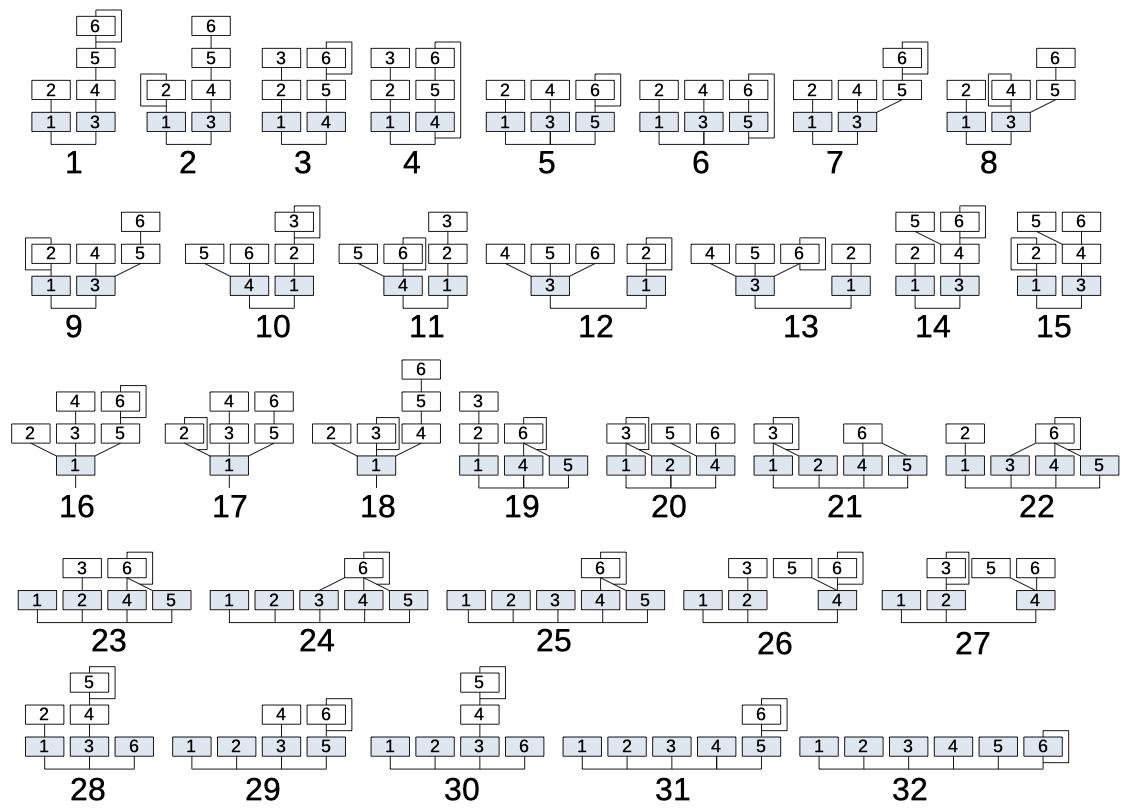
For example, in Algorithm 8: Operators 1 and 3 (the carriers) are summed to form the output. Operator 2 modulates Operator 1. Operators 4 and 5 are summed to modulate Operator 3. Operator 6 modulates Operator 5. The loop on Operator 4 indicates self-modulation.
Avoid algorithms 4 and 6, which involve feedback between different operators (cross-operator feedback). All other algorithms are allowed.
Self-Modulation#
Some DX7 algorithms include an operator that modulates itself, shown as a looping arrow in the diagram. To implement self-modulation, pass a non-zero feedback value to your operator function. Because \(y[n]\) depends on \(y[n-1]\), you must compute self-modulating operators sample-by-sample with a for-loop rather than using vectorized NumPy operations.
Requirements#
Each requirement is worth the points listed. These 80 points are the manually graded part of your grade. The other 20 come from the Gradescope formatting check.
Requirement |
Points |
|---|---|
You implement an |
12 |
You implement two DX7 algorithms (one per preset) by wiring 6 Operator instances according to the DX7 routing diagrams. Algorithms 4 and 6 are excluded (cross-operator feedback). Each algorithm is worth 8 points. |
16 |
You define two preset instrument functions with the signature |
8 |
The two presets produce meaningfully different timbres, not just different pitches or volumes. |
6 |
|
4 |
|
5 |
You define a |
8 |
|
3 |
|
3 |
|
6 |
|
9 |
Total |
80 |
Bonus#
Parse a real DX7 patch from a SysEx (.syx) file and use its parameters to configure your synthesizer. Original DX7 patches are available at Yamaha Black Boxes. You can compare your output sound with this web-based emulation for accuracy. Document which patch you recreated and how closely your output matches in TECHNICAL.md.
Submission#
Your submission must conform to the technical format. Bundle the following into a single .zip file (under 100MB) and submit it via Gradescope.
demo.mp4,demo.mov, ordemo.mkv: a 120-300 second screen recording, narrated in your own voice, explaining your approach and demonstrating your result. See the technical format for the required presentation flow.TECHNICAL.md: use the open-ended template and leave all## Section Headingsunchanged. Your write-up must state:Which two DX7 algorithms you implemented and why you chose them.
How you implemented your
operatorfunction.The parameter values for each of your two presets (frequency ratios, output levels, envelope settings) and how you chose them.
How your
midi_to_dx7routes MIDI programs to presets.If you attempted the bonus: which SysEx patch you recreated and how it compares to the original.
src/: your Python/Pyquist code plus any sound assets it needs. Anything we canpip installdoes not need to be included. At minimum this directory should contain something like:dx7.ipynbordx7.py: your Operator implementation, algorithms, presets, and MIDI rendering.preset1.wav: a single note from your first preset.preset2.wav: a single note from your second preset.song.wav: a MIDI file rendered with your presets.
Note
The Gradescope autograder only checks the top-level structure of your zip file. It does not verify the specific contents of your src/ directory. Making sure the files above are present, complete, and runnable is up to you.