Week 3 // June 16 - June 22
Week 3 started early: Jessica, Laurel, Mo and I met this Sunday (June 15). Alla joined us via phone and we all exchanged and brainstormed ideas as to which direction we'd like to take the current project. We discussed the papers we've read and the ways they might influence our research. Jessica and Alla added more papers to the "To Read" list.
An hour flew by very quickly. We decided that we (Laurel, Mo and I) will "meet" one more time with Alla, before our next meeting with Jessica.
 |
| Melissa |
 |
| Ishita (left) and Laurel (right) |
On Monday (June 16) I got in touch with another CRA DMP intern, Melissa, who is working at the Human Computer Interaction institute on Craig St. We planned on getting together for lunch, and later watch a movie at the park on Wednesday. I'm very excited about meeting another DMP intern and learning about her research & experience in 'burgh. I also met an undergraduate student from CMU, Ishita, who will be working with Jessica this summer. She still is not sure what her project will be about, so she was just exploring the Vicon system and Maya.
For some reason my Kerberos account, which I used to access the web-server, wasn't working. I had to ask Help Desk to restore it, so that I could create a web-page listing the reference papers that I am reading. Currently, I have about ten of them and it's getting a little harder to keep track of them.
On Tuesday (June 17) Laurel, Mo and I met with Alla, who "attended" the meeting over the phone. We discussed Maya's capabilities and the features we may want to/should explore. We brainstormed the types of characters we're interested in and the problems we want to solve. The meeting narrowed down our search and gave us items to work on for our next week's Tuesday meeting with Jessica.
 |
| Chicken Head Model: click on the picture to see the full Maya screen |
Based on the discussion from our meeting I decided to learn how to rig characters in Maya. I spent the rest of the week working in the mocap lab. Elise, who is an undergraduate student from CMU and who also works in the mocap lab, had a tutorial that showed how to do facial rigging.
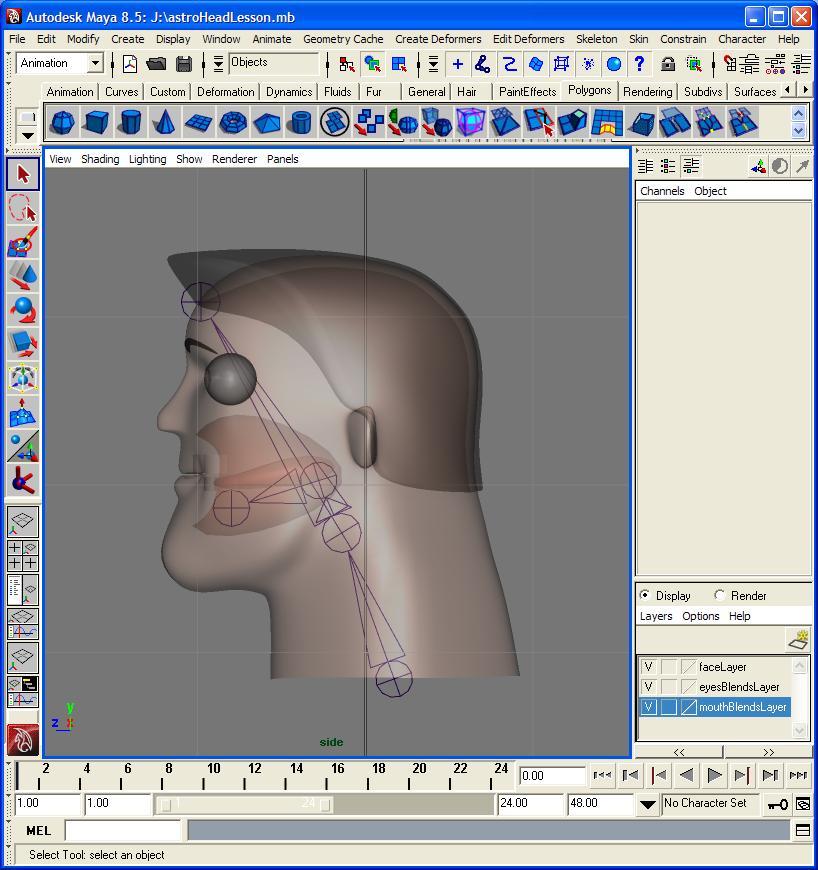 |
| Astro Head Model: click on the picture to see the full Maya screen |
In order to follow the tutorial videos, I asked Elise if she had a model (with eyes, eyebrows, etc.) that I could work on. She found her old project where she animated a chicken :-). Something was wrong with its dimensions and Maya wouldn't let us edit its properties. It was a good thing that later I found an actual file that went along with the tutorial. However, because the file was from an earlier version it didn't let me switch between the views in Maya (side, front or orthogonal view). This made it very hard to create and animate joints, because in order to do that I needed to look at the model from different angles. I managed, however, to go through 4 tutorials and setup neck and head rigs.
I also researched quite a bit about Maya's retargeting capabilities. I am planning on setting up a separate section on the Links page to list the helpful sites about Maya's features and tutorials.
| <<== Previous Week |