
|
home | projects | hobbies | resume | links | contact |
|
PalmProject Task 2 |
||
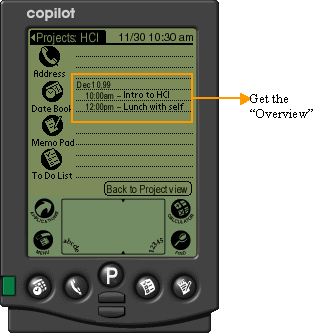
1.Start in Datebook application 2.Enter new information into appropriate day of Datebook and highlight it 3.Tap “Put into Project” button 4.Choose appropriate project and tap “OK” button to return to Datebook 5.Newly entered information now has a PalmProject icon on its line 6.Tap PalmProject icon to enter PalmProject view where newly entered information
|
||
 |
||
|
|
||
 |
||
|
|
||
 |
||
| [PalmProject Task 1] [PalmProject Task 2] [PalmLink Task] | ||
| Palm Pilot Redesign (08/99, 3 months) | ||
 |
||
| In-flight
entertainment system . Stockphone
. Allbank web . Chinese Gardens
. Architecture dept web . Real estate buying
system . eToys web
design .Car Music
System . Visage
redesign . Palm
Pilot III redesign
home | projects | hobbies | resume | links | contact
|
||
