| |
|
Purpose
This project is designed to teach children how televisions receive and transmit images. Although this is a complex process, the scope of this project is to teach the following principles:
1. Images are made up of pixels.
2. The image is transferred to the TV screen pixel by pixel.
3. Your brain combines the pixels to form one image.
4. All images on the screen are made from 3 colored pixels: red, blue and green.
Materials
1. Plastic Grid Box, 14 x 8 grids at least .5" thick
2. A Stand made out of wood
3. Color codes written on a paper for the Decoder. The colors used are:
BL = Blue
G = Green
Y = Yellow
O = Orange
R = Red
B = Brown
4. Graph paper
5. 3 lb. King Size bag of M&M candies – separated by color
6. Glue, to glue the plastic grid box to the stand
7. A watch
8. Pencils
Teacher Instructions - Setting up the activity
1. Take graph paper and divide up in to same number of rows and columns as your plastic grid (8 x 14).

2. Use the M&M colors, and create a picture or multiple pictures.
3. Take a new piece of graph paper, and now make a coded grid, replacing the color with the color abbreviations listed above. This is the code grid.

4. Copy as many of these as needed
5. For each pair of children you will need a stand for the grid. We made ours from balsa wood. It should be slanted so the child can see the picture, and support the grid so the M&Ms do not fall through.
6. Fasten the grid to the stand
7. Photocopy enough Activity Sheets and Data Sheets for all children
Activity Instruction
1. Find a partner, one of you will be working as a decoder, and the other one will be the Receiver, receive the codes and transmit image on the TV screen.
2. Decoder: Read the color codes on the given paper to your partner. Read it from left to right, one by one. When you finished one line, go on to the next line, starting from the most left grid go to the right and so on.
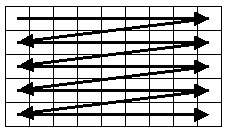 Receiver: Listen to the Decoder. Fill each grid of the TV screen with M&M that has the color that the Decoder tells you. You will be filling the grid box in the same order as the Decoder, from left to right (See diagram above)
3. While decoding the codes and filling in the grids, you might want to try guessing the image. You should be able to see the final image, when you finish filling in the grid box.
|
|