Exercise 7: Breakout, Part II
This lab uses the concept of subclasses, a central feature of
object-oriented design. You won't find it addressed in your textbook,
but here are some notes
drawn from the programming course Carl Burch taught at CSB/SJU.
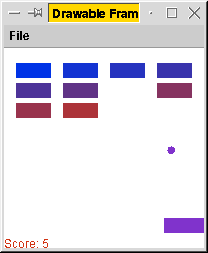 In this lab, we complete our Breakout program by adding a paddle
that the user manipulates. We'll accomplish this by slightly modifying
our Ball and Block classes from Lab 2, then by
defining two subclasses - one to represent a paddle (which is a
subclass of the Block class, inheriting the rectangular
properties defined there), and one to represent the window.
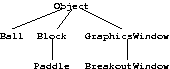
After we finish, we'll have the following inheritance hierarchy for
our program.
In this lab, we complete our Breakout program by adding a paddle
that the user manipulates. We'll accomplish this by slightly modifying
our Ball and Block classes from Lab 2, then by
defining two subclasses - one to represent a paddle (which is a
subclass of the Block class, inheriting the rectangular
properties defined there), and one to represent the window.
After we finish, we'll have the following inheritance hierarchy for
our program.
Part A. Multiple blocks
The first thing we'll do is to set up the game so that there are multiple blocks, each
destroyed when the ball hits it. Download
BreakoutWindow.java and add it to your Exercise 6 project (with the Ball
and Block classes you defined). You'll need to designate this class as the main
class, as per the supplemental Eclipse instructions.
The BreakoutWindow class that I give you stores all the blocks in an array, and it
bounces the balls among the blocks. You are to modify its behavior in three ways.
- When the ball bounces off a block, the block should disappear.
The easiest way to do this is to set that array element to null,
essentially indicating that the block no longer exists, and then to
decline to draw null blocks when you redraw blocks.
- Your program should track the user's score. The user gets 10 points for
each block hit. This score should be displayed in the lower left corner
of the screen. You'll want the readString method of the Graphics class to do this.
- When all blocks are gone, the program should automatically exit. The
dispose() method of the GraphicsWindow
class should close the window and the program.
(You may be tempted to detect when all the blocks are gone based on the current score.
Don't do it that way: Once the user starts losing points for losing the ball, it won't work
any more.)
You should be able to test your program at this point to ensure it works as it ought.
Part B. Losing the ball
The next step is to remove the floor from the window. We're going to set things up so that
each time the ball goes off the bottom of the window, the user loses 25 points and the
ball reappears at its initial location.
- Add a new constructor method to Ball that takes another
Ball as a parameter and copies all the instance variables of that
ball into the instance variables of the new ball.
- Modify the step() method of Ball so that it does not bounce
off the bottom of the window. Also, modify this method to return a
boolean indicating whether the ball is still on the screen after
the ball is stepped.
- In the run method of BreakoutWindow, make it so that the ball being
bounced around is a copy of the initial ball (using your new constructor method).
Ball ball = new Ball(initial_ball);
Thus, while ball moves, initial_ball remains unchanged.
Once ball goes off the window, you can create a new ball
at the initial state
by simply creating another copy of initial_ball.
- If the step() method of Ball returns false, then you
should reinitialize the ball variable
(copying from initial_ball using the new Ball constructor method).
This should make the ball reappear at its initial
location when the ball goes off the bottom of the window.
Also, you should decrease the score by 25 when this occurs.
- Add the following methods to the Block class.
- int getLeft()
- Returns the x-coordinate of the block's left side.
- int getRight()
- Returns the x-coordinate of the block's right side.
- void shiftRight(int dist)
- Shifts the block dist pixels to the right.
Actually, these methods aren't useful yet; we'll use them in Part C when we get to
the paddle.
Before going on, test the program to make sure it works as it ought.
Part C. The Paddle class
Define a new class called Paddle, a subclass of the
Block class, with the following constructor.
- Paddle(int in_left, int in_top, int in_width, int in_height)
- Creates a paddle in_width pixels wide and in_height pixels
tall, whose top left corner is initially at
(in_left,in_top).
Instance variables for the paddle's position and size are inherited
from the Block class. These instance variables are declared
private in Block, but you won't need to access them directly.
Instead, you can use Block's instance methods.
You will want the Paddle class to define a private instance
variable to track the paddle's current velocity. The paddle's
initial velocity will be 0.
The Paddle class should add the following two methods.
- void addToVelocity(int delta)
- Modifies the paddle's velocity by delta.
- void step(GraphicsWindow window)
- Shifts the paddle according to its current velocity, keeping within
window. You can use the methods of the GraphicsWindow
class to determine how big the window is.
Shifting the paddle is similar to shifting the ball, but it's much
simpler since the paddle only moves horizontally. When the paddle hits
the edge of the window, it should move no further. I recommend
resetting the paddle's velocity to 0 when this occurs.
Part D. Finishing Breakout
Now we'll add a Paddle instance variable in the BreakoutWindow class.
The constructor method for the window will initialize
the paddle to its initial location. I recommend a 40x15 paddle,
initially located at (10,170).
To make it so that the keyboard controls the paddle, you'll want to override the
keyPressed method in the GraphicsWindow class.
- void keyPressed(char c)
- Changes the paddle's velocity based on c: The comma key
should decrease the velocity by 1 and the period key should
increase the velocity by 1. (You can check whether the parameter c is a comma
using the following code.
if(c == ',') { //...
Notice the single quotes, designating a character instead of a string!)
You'll also want to modify the run method so that it draws the paddle, steps the
paddle, and bounces the ball of the paddle.
When you run the program, the paddle should be drawn on the screen,
the user should be able to control the paddle via the keyboard,
and the ball should bounce off the paddle.
The game should still terminate after all blocks are gone.
If all these things occur, your game is complete.