The Priority Dialog Box
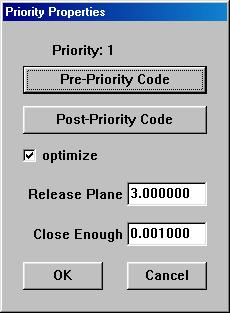
The priority dialog box is accessible by double-clicking on the on any
one of the priorities listed in the priority column of the ACEconverter
window. This means, of course, that a DXF file must be loaded into
ACEconverter before accessing the Layer dialog box.
This dialog allows the user to:
-
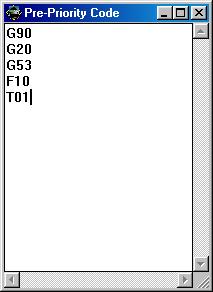
Insert user code both before and after the priority is generated.
e.g.:
-
Optimize the priority. If checked, all the entities that belong to
the priority will get optimized and coded in a systematic manner to make
code most efficient.
-
Set the release plane. This value is used when generating the code
for pen up, or non cutting moves. It is the height at which the tool
will release to in order to make the move.
-
Set the close enough value. This value determines whether the machine
needs to release to the release plane to make a jump from one entity to
another. A rule of thumb would be to set this value to half of the
tool diameter in order to optimize the code further.
Back To ACEconverter Help Index