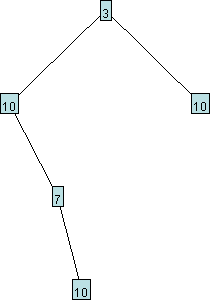
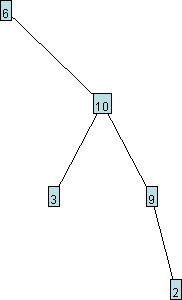
 For each node, your method should randomly choose how many of the
nodes in the tree should appear to the left of the current node, and
how many should appear to the right.
For each node, your method should randomly choose how many of the
nodes in the tree should appear to the left of the current node, and
how many should appear to the right.
 and we now call reflect(myTree), then myTree should
now appear as follows:
and we now call reflect(myTree), then myTree should
now appear as follows:
 Your method should not create any new nodes.
 and we now call condense(myTree), then the method will return
a reference to the root of the condensed tree, which should appear as
follows:
and we now call condense(myTree), then the method will return
a reference to the root of the condensed tree, which should appear as
follows:
 Your method should not create any new nodes.
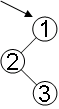

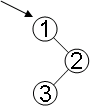
 We might be tempted to simply follow a preorder traversal and output
the sequence of visited nodes to a file. Unfortunately, however,
every one of the trees shown above would result in the same preorder
traversal: 1, 2, 3. Therefore, if we stored 1, 2, 3 in a file, we
would not have enough information to recover the original shape of the
tree. One solution to our problem is to output an extra marker every
time we reach a null. We'll use $ for this purpose. Below are
several simple examples of a tree and the text file produced when that
tree is saved to a file.
We might be tempted to simply follow a preorder traversal and output
the sequence of visited nodes to a file. Unfortunately, however,
every one of the trees shown above would result in the same preorder
traversal: 1, 2, 3. Therefore, if we stored 1, 2, 3 in a file, we
would not have enough information to recover the original shape of the
tree. One solution to our problem is to output an extra marker every
time we reach a null. We'll use $ for this purpose. Below are
several simple examples of a tree and the text file produced when that
tree is saved to a file.
| Tree | Text File |
|---|---|
 | $ |
 | 1 $ $ |
 | 1 2 $ $ $ |
 | 1 $ 2 $ $ |
PrintWriter out = new PrintWriter(new FileWriter("somefile.txt"));
out.println("some");
out.println("text");
out.close();
Scanner in = new Scanner(new File("somefile.txt"));
String firstLine = in.nextLine();
String secondLine = in.nextLine();
in.close();
Is it tall? no
Is it Dave? yes
I win! On the other hand, if the computer's final guess is incorrect, the computer will ask for the correct answer and a characteristic to distinguish that correct answer from the computer's incorrect answer, and will modify the decision tree to reflect this new knowledge. This is illustrated in the transcript below for a different call to twentyQuestions, using the same decision tree: Is it human? no
Is it a fish? no
I give up. Who/what is it? a piano
What distinguishes a piano from a fish?
a piano is something you can tune After this call to twentyQuestions, the decision tree will now appear as follows:
 Go ahead and complete the twentyQuestions method. The
printed text should be formatted exactly as shown in the sample
transcripts above. When new knowledge must be added to the tree, your
code should create only two nodes. Your code should work
even if there is only one node in the tree.
The static variable userInput has been initialized to refer
to a Scanner for reading user input from the console. The
following line of code will allow the user to enter a line of text and
store the result in s:
String s = userInput.nextLine();
Optional: When you have finished this, you might consider
creating a little game for yourself, where the computer loads its
knowledge from a file, and plays multiple rounds of twenty questions,
saving the modified tree whenever it learns something
new.
Go ahead and complete the twentyQuestions method. The
printed text should be formatted exactly as shown in the sample
transcripts above. When new knowledge must be added to the tree, your
code should create only two nodes. Your code should work
even if there is only one node in the tree.
The static variable userInput has been initialized to refer
to a Scanner for reading user input from the console. The
following line of code will allow the user to enter a line of text and
store the result in s:
String s = userInput.nextLine();
Optional: When you have finished this, you might consider
creating a little game for yourself, where the computer loads its
knowledge from a file, and plays multiple rounds of twenty questions,
saving the modified tree whenever it learns something
new.