- If the Terminal icon (below) is on the dock., click it and a terminal window will appear
- Otherwise, launch the Finder, and on its toolbar select Applications and double click the icon labelled Terminal.

Most course materials that I will provide are either .html files viewed directly in a browswer, or .zip file files which should be downloaded onto your desktop. Clicking an html link causes its page to be displayed in your browser. Clicking a zip file link causes its contents to be saved onto your computer and be unzipped (the browser places both on the Desktop).
Unzipping Files
Normally, Mac OS X will automatically unzip any file that you download through a web browser. Typically, you will see both the zipped file and the unzipped folder on your desktop (although you also might have to first click on the desktop). If you see only the zipped file (not the unzipped folder), double click the zipped file and it should produce the unzipped folder.Zipping Files (in the cluster)At this point you can delete (throw into the waste basket) the zipped file; you can always redownload it from the web.
All of your programming assignments must be turned in as a zip file that contains all the files inside a project folder.
There are now three different ways to zip up projects on the Macs in this cluster. However, some of these techniques may not work on Macs in other clusters.
Method 1:
Method 3: zipping on a Mac in any cluster:
Note: If you own a Macintosh, there may still be issues with zipping files from your dorm computer (check here for more info).
Suppose that your folder is called Folder (it should be located on the desktop).
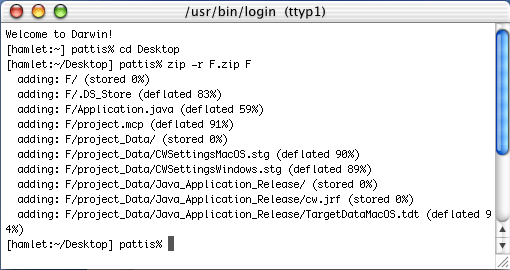
A new file icon named zippedFolder.zip will appear on the desktop ; the original (unzipped) folder will still be there too. You probably will first to click the desktop to see this zipped file on the desktop.
The above descriptions will work for zipping files on any of the Macs in Wean 5419. However, these machines have additional software which may not exist on your own Mac.
Warning: You may be aware of other zip applications for the Mac; however, not all of the zip applications will work with our submissions system. For example, early versions of Mac's Stuff-it uses a non-standard deflation algorithm -- if you submit a project that was zipped up using Stuff-it, our automated software will not be able to unzip the project -- the submission confirmation window should indicate that the submission could not be unzipped.
At this point, I don't know how you can download the new version of Stuff-it that is used in the Wean cluster.
Here is a procedure that will let you download the necessary programs to your home Mac that will allow you to zip files as demonstrated above. This download is free but you will also end up downloading a lot of other Mac software in addition. You must have Mac's OS X and you will need a reasonable amount of free space.
You can get the free on-line zip command (that we have in the classroom) if you download the MacOS X Developer Tools. This requires you to first register at the Apple Developer Connection site (http://www.apple.com/developer/ ). The registration is free.Once registered,
The package is large since it contains (among other things) Project Builder and Interface Builder.
- go to the "Download Software" page, then to the "Mac OS X" sub-page.
Find the appropriate "Mac OS X Developer Tools" package for the version of the MacOS 10 that you're using.