This document explains how to code a simple Port-Based Agent (PBAgent) that runs within the Port-Based Adaptable Agent Architecture (PB3A).
Back to the main tutorial page.
This tutorial will take you step-by-step through the process of creating a
simple, runable PBAgent. The basic PB3A features discussed are as follows:
This tutorial does not offer an exhaustive treatment of PB3A's many features.
Issues that are not covered in this tutorial include:
The Advanced PB3A Tutorial
discusses the the advanced features of PB3A.
Introduction
If you have not already done so, familiarize yourself with the
PB3A Basics. Once you are familiar with the PB3A environment, it is time
to learn how to code an agent that can execute within this environment. We will
implement a simple square wave generator.
A Simple PBAgent
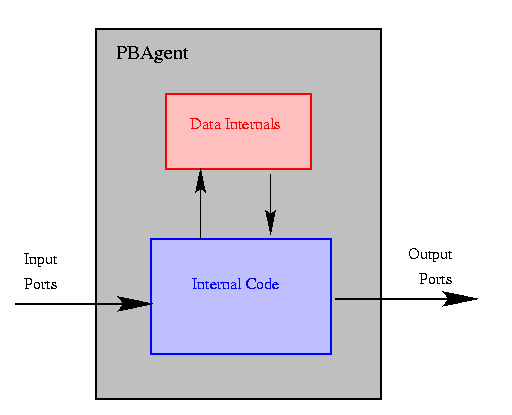
A Port-Based Agent (PBAgent) is an abstraction of a functional unit of code. The code is permitted to have internal variables and state and it communicates with the world through a set of input and output ports. The figure below shows this abstraction.
As shown in the image, an agent consists of data internals and code. The code can interact with the outside world via the input and output ports. The code can directly access the data internals, but the outside world cannot.
To view a simple PBAgent template, click here.
This template shows the most basic methods that must be overridden for an agent to
function. This section will go through the details of designing a simple square
wave generator from this point.
Java Details
A simple detail, but an important one: you must define a proper Java package and you must be sure to properly import adaptive.core.*. The specifics of this may vary depending upon your Java configurations. Please refer to Java documentation for more information regarding packages.
PBAgent is an abstract class defined in adaptive.core. Extend this into a new class of your own naming. For our square wave generator, we would do as follows:
public class PBASquareWave extends PBAgent{

      /* we'll fill in the rest shortly! */
}
Note that the PB3A module manager will not be able to load your agent if you
do not declare the class to be public.
Agent Data Internals
The first code to appear within an agent should be definitions of any constants and data internals. Any data vaule that must be maintained between agent executions must be declared at this point.
For our square wave generator, we will need internal variables for the frequency and duty cycle of the wave and a variable to indicate the previous state of the output. The code for this is shown below.
Tip: defining constants for each of the port numbers improves code readability!
public class PBASquareWave extends PBAgent{

   final static int WAVEOUT = 0;  //this is the port number

   protected float frequency;
   protected float dutyCycle; //fraction of time high in range [0, 1]
   protected int periodHigh;
   protected int periodLow;
   protected boolean prevLevel;


   /*  the agent's methods will go here   */


}/* end PBASquareWave */
Now we will talk about overriding the necessary methods to make our square wave generator really work.
The first order of business is to tell the system how many input and output ports
we will have in our system. Then we must tell the system the type of each port.
The final requirement is to set the frequency at which our agent will run. We
can also optionally give each port a unique name. All of this is accomplished in
the initialize() method.
First, we call the method setNumInputsOutputs(int, int). The first
parameter is the number of input ports, the second is the number of output ports.
Next, we define the type of each port. Since we are just generating a square
wave, we might want to use a boolean port type. In PB3A, ports will
only pass objects. This means that we must use the Java object
Boolean in lieu of the base type boolean. Similarly, if we
had wanted an int output, we would have needed to define the port to
be of type Integer. The setOutputPortType(Class, int)
method is used to set the port type. The first argument is the type of the port.
The second argument is the port number. There is a similar method for typing
input ports (setInputPortType(Class, int)).
At this point, we may wish to assign a name to our port. This becomes especially
handy when composing a system from the ModuleManager. The method
setOutputPortName(String, int) can be used for this purpose. The first
argument is simply a string that identifies the port. The second parameter is the
port number. An analogus method exists for the naming of input ports (
setInputPortName(String, int)).
All loop-based agents preiodically wake up, execute, and then go back to sleep.
There are two ways to control the sleep time of a PBAgent. We can call the
sleep(int) function from within our runLoop() or we
can set it to a constant value by calling the setSleepTime(int)
method here. The system will automatically call sleep() at the end
of runLoop() and the default time is set to 250 msec. For times
other than this or to turn off the automatic call of sleep(), we must
use the setSleepTime(int) method. The paramter is the sleep time in
milliseconds.
The completed initialize() method for our PBASquareWave agent is
shown below. Notice that we have used the port number constant to help make the
code more readable. Also, we have elected to call sleep() ourselves,
which means we have shut off the automatic call by passing a zero to
setSleepTime().
/**********************************************************************
Description: Required default constructor required by Agent interface.
sets the number, type, and names for input and output ports
@param none
@return nada
@exception none
**********************************************************************/
  public void initialize(){

    setNumInputsOutputs(0,1);
    setOutputPortType(Boolean.class,WAVEOUT);
    setOutputPortName("Square Wave",WAVEOUT);
    this.setSleepTime(0); //turn off default sleep - we'll be calling sleep()

  } /* initialize() */
All agent outputs must be initialized prior to beginning execution. This
method is used to do just that. For each output port in our system, we define
a default value using the setOutput(Object, int) method. This is
the same method that is used to set an output value during normal execution.
The first argument is the Object that is to be passed to the output
port. The second argument is the port number.
In our square wave generator example, we can rather arbitrarily choose an
initial value. Below is the code defaulting the output to FALSE.
/**********************************************************************
Description: initializes output ports' values.
@param none
@return boolean (true=success),(false=failure)
@exception none
**********************************************************************/
  protected boolean initOutputVals(){

      setOutput(Boolean.FALSE,WAVEOUT);
      return( true ); //no errors

  } /* initOutputVals() */
This is where all of the agent's internal resources are allocated and initialized.
For example, this is where we would "new" any member objects. We do
not need to acquire such resources in our example, but we do have internal variables
that need to be initialized. The code used in our example is shown below.
/**********************************************************************
Description: allocates data internals.
@param none
@return nada
@exception none
**********************************************************************/
  protected void allocateInternals(){

      int period;
      this.frequency=2;
      this.dutyCycle=0.1f;

      period=(int)(1000.0f/frequency);
      this.periodHigh=(int)(period*this.dutyCycle);
      this.periodLow=(int)(period*(1-this.dutyCycle));

      this.level=false;

  } /* allocateInternals() */
This method is where the work is done during execution. A loop-based agent
will enter runLoop() when awoken. For our simple example,
runLoop() just calculates the amount of time for which to sleep,
toggles the output, and goes to sleep. The code is given below.
Notice how setOutput(Object,int) is called. A new
Boolean object is passed along the port. Could we simply maintain
an internal variable of type Boolean and pass that along the output port?
Strictly speaking the answer is yes, but this is generally frowned upon. The
reason is that objects are pased by reference, allowing an agent the ability to
modify any data it sees on its input ports. If we simply put a reference to an
object internal to our agent on the output port, a malicious agent could then modify
the contents of that object and sabbotage us. Thus, it is generally recommended that
you pass a copy of an object along your outputs.
/**********************************************************************
Description: Required main loop of the agent.
     Called with each cycle of operation for the agent
@param none
@return nada
@exception none
**********************************************************************/
  public void runLoop(){

      int sleeptime=this.periodHigh;

      if (level) { //wave is high, switch to low
          level=false;
          sleeptime=this.periodLow;
      }
      else{//wave is low, switch to high
          level=true;
      }

      setOutput(new Boolean(level),WAVEOUT);

      try{
          sleep(sleeptime);
      }catch(InterruptedException ie){}

  } /* runLoop() */
Finally, we need to deallocate any resources that we might have utilized and perform any shutdown routines. Java takes care of garbage collection, so we don't need to explicitly free dynamic memory here. This method is most usefull for closing any open files and/or saving the agent's state. Please refer to the Advanced PB3A Tutorial for information on serializing agents.
In our simple agent, we really have no need for this method. Thus, we will stick with the default method as defined in PBAgent by not overriding it here.
That's it, you're done! Click here to see the final version of our square wave generator. That was pretty easy, eh? Now you are ready to take on the port-based world!
Now give the Advanced PB3A Tutorial a try. That's where all the really interesting secrets are kept!
Cheers!
Back to the main tutorial page.