Within ModuleManager lies the capability to call a gui editor so that a user can edit the state of an agent by hand. But for security reasons, this capability needs to be activated in the agent by the programmer. We have two options: use the default state editor or provide our own. We'll do the former for now.
To use the default state editor we need two functions: the getDefaultState() method we added earlier, and getStateDescriptions(). getDefaultState() is used not only to provide default values, but also to allow the default state editor to do type checking on the state the
user enters. getStateDescriptions()
is used to provide labels for each variable stored within the state.
I should point out here that the default
state editor can only parse states stored in the array of Objects format.
Additionally, it will only let you edit
variables within the state that are one of the following classes:
String, Integer, Float, Double, Long, Short, Character, Byte, Boolean, or an array of one of those classes.
    public Object getStateDescription(){
	String[] descript=new String[2];
	descript[0]="Frequency";
	descript[1]="Duty Cycle [0,1]";
	return descript;
    }
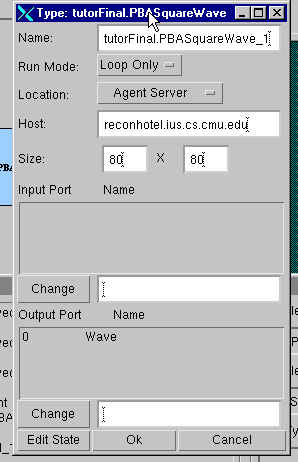
That's it! Recompile PBASquareWave and now we can edit its state Module Manager. To do so, right click on the agent in your configuration in Module Manager and bring up the properties window (see picture below).
Now click on the Edit State button, and the state editor window will pop up. Change the values to something else (e.g. frequency = 4, duty cycle = 0.7).Click OK on both the state window and the properties window. Save your configuration and execute. Notice how the waveform has changed.
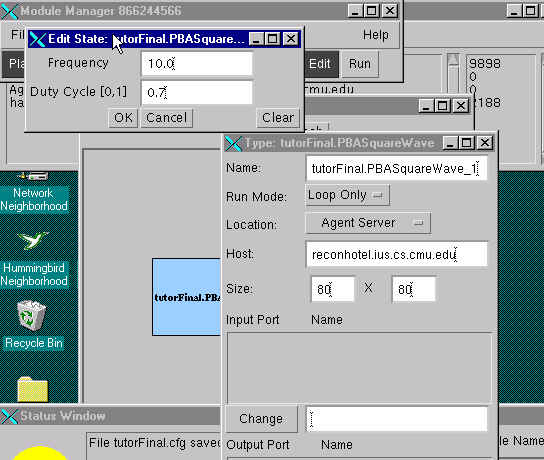
Now you've successfully used the default state editor. But try some values in the state that shouldn't be valid (e.g., negative frequency or duty cycle greater than 1).The state editor doesn't complain at all, nor does our agent. If you're lucky, it'll run with unusual results; if you're not, it'll throw an exception. So let's change the way the agent processes its state so that it can handle invalid state values.
/**********************************************************************
 takes a dumped object and loads it into my state.
@param none
@return true == OK, false == bad.
@exception none
**********************************************************************/
  public boolean processInternalState( Object statearr ){
    boolean retval=true;
    float period;
    Object[] state;
    System.out.println(getID()+" is processing internal state...");
    if (statearr!=null){
	state=(Object[])statearr;
    }
    else{
	state=(Object[])getDefaultState();
    }
    try{
	this.frequency=((Float)state[0]).floatValue();
	this.dutyCycle=((Float)state[1]).floatValue();

	if (this.frequency <0) this.frequency=0;
	if (this.dutyCycle <0) this.dutyCycle=0;
	if (this.dutyCycle >1) this.dutyCycle=1;

	period=1000.0f/frequency;
	this.periodHigh=period*this.dutyCycle;
	this.periodLow=period*(1-this.dutyCycle);
    }catch(Exception e){
	retval=false;  //failed to get a valid state.  Do not start this agent.
    }
    return (retval);
  } /* processInternalState() */
Now invalid state elements won't kill your agent, but it doesn't really do anything to warn you that something was wrong. Wouldn't it be nice if the state editor wouldn't let you enter invalid parameters? To do that, however, we'll need to write our own state editor.
Our state editor needs to implement the interface
adaptive.modulemanager.StateEditor. The
only method required by this interface is editState().
This function takes as input an instance of
the class adaptive.modulemanager.Module and returns nothing.
Fortunately, there is a base class we can
use for our state editor that handles all the necessary interfacing to
adaptive.modulemanager.Module. It is
adaptive.modulemanager.BaseStateEditor.
It is an abstract class; so, we must extend this class for our state
editor. All we have to implement
ourselves is two methods: setupPanel(),
which creates a java.awt.Panel object containing the gui elements necessary
for editing and commitState() which returns the new state.
Unlike the default state editor, this base
class enforces no conventions about the format in which the state is stored.
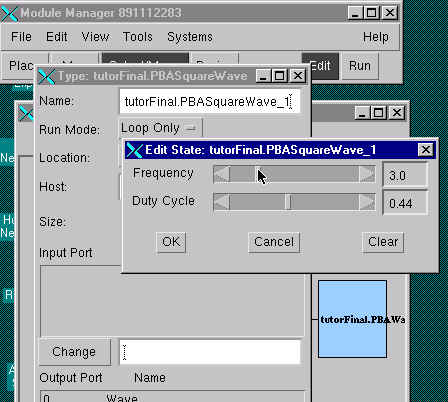
Now for our new state editor, we're going to add scrollbars to set the actual values for the frequency and duty cycle. These let us give clear bounds on the allowable values and make those bounds graphically clear to the user. But to make it easier to tell what the values we're actually giving the agent, we'll keep the text fields but make them only display the setting. And of course, so it's possible to tell which scrollbar is for which variable, we'll have text labels.
So that Module Manager knows about our new state editor, we
must add a new method, getStateEditor(), to PBASquareWave
that returns an instance of that state editor.
Because our state editor class is so small we'll also create it as an
anonymous class right within that method. For our state editor, we must also import the packages java.awt,
java.awt.event, and adaptive.modulemanager.
Here's the code for getStateEditor():
   import java.awt.*;
   import java.awt.event.*;
   import adaptive.modulemanager.*;
  /***************************************************************************
   *
   * Returns the GUI dialog internal state editor. This should return
   * a new instance of the StateEditor. Or null if there is no state
   * editor.
   *
   * @param
   *
   * @return the gui state editor
   *
   * @exception
   *
   **************************************************************************/
  public StateEditor getStateEditor(java.awt.Frame parent) {

      return new BaseStateEditor(parent){
	  float freq;
	  float duty;
	  TextField printFreq;
	  TextField printDuty;
	  public Panel setupPanel(){
	      Object[] statearr=(Object[])state;
	      freq=((Float)statearr[0]).floatValue();
	      duty=((Float)statearr[1]).floatValue();
	      Panel panel=new Panel();
	      GridBagLayout layout=new GridBagLayout();
	      GridBagConstraints gbc=new GridBagConstraints();
	      panel.setLayout(layout);
	      Label f=new Label("Frequency");
	      Label d=new Label("Duty Cycle");
	      Scrollbar freqBar=new Scrollbar(Scrollbar.HORIZONTAL,
                           (int)(freq*10) , 1, 0, 150);//freq *10, need to be ints
	      Scrollbar dutyBar=new Scrollbar(Scrollbar.HORIZONTAL,
                           (int)(duty*100), 1, 0, 100);//duty cycle in percent
	      printFreq=new TextField(4);
	      printFreq.setText(""+freq);
	      printFreq.setEditable(false);
	      printDuty=new TextField(4);
	      printDuty.setText(""+duty);
	      printDuty.setEditable(false);

	      gbc.fill=GridBagConstraints.NONE;
	      gbc.anchor=GridBagConstraints.CENTER;
	      setConstraints(gbc,0,0,1,1,10,10);
	      panel.add(f,gbc);
	      setConstraints(gbc,0,1,1,1,10,10);
	      panel.add(d,gbc);
	      setConstraints(gbc,3,0,1,1,10,10);
	      panel.add(printFreq,gbc);
	      setConstraints(gbc,3,1,1,1,10,10);
	      panel.add(printDuty,gbc);
	      gbc.fill=GridBagConstraints.HORIZONTAL;
	      setConstraints(gbc,1,0,2,1,100,0);
	      panel.add(freqBar,gbc);
	      setConstraints(gbc,1,1,2,1,100,0);
	      panel.add(dutyBar,gbc);

	      freqBar.addAdjustmentListener(new AdjustmentListener(){
		  public void adjustmentValueChanged(AdjustmentEvent e){
		      freq=(float)e.getValue()/10.0f;
		      printFreq.setText(""+freq);
		  }
	      });
	      dutyBar.addAdjustmentListener(new AdjustmentListener(){
		  public void adjustmentValueChanged(AdjustmentEvent e){
		      duty=(float)e.getValue()/100.0f;
		      printDuty.setText(""+duty);
		  }
	      });
	      return panel;
	  }
	  public Object commitState(){
	      Object[] myState;
	      myState=new Object[2];
	      myState[0]=new Float(freq);
	      myState[1]=new Float(duty);
	      return myState;
	  }

      };
  }
Now recompile PBASquareWave, and try editing its state in Module Manager. You'll see a window that looks like the one shown below. I should mention that if you make changes to the code for the state editor after using it once, you'll need to restart Module Manager to get it to load your new state editor.
| Prev | Next |
Copyright 2000, Carnegie Mellon University
This page written by Jonathan Jackson
Last modified: Thu May 18 19:12:14 EDT 2000