Requirements Analysis Document
STARS Project - Workflow Subsystem
15-413 Software Engineering
Fall 1999
Carnegie Mellon University
Pittsburgh, PA 15213
Revision History:
Version R0.1 10/06/99 Paul Cassella - created
Preface:
This document addresses the requirements of the Workflow Subsystem of the STARS system. The intended audience for this document are the designers and the clients of the project.
Target Audience:
Client, Developers
Workflow Team Members:
Paul Cassella, Daniel Heller, Kaushik Merchant, Brian Parkison, Brian Showers, Adi Zukerman
Workflow Coach:
Grace Ritter
General Goals
The workflow subsystem will be the glue for other STARS subsystems by supplying document management. Through the workflow subsystem, the authoring subsystem will be able to store, manage, and edit IETMs; and the maintenance subsystem will be able to store and manage work orders. The workflow subsystem will be designed so that any general type of document can be managed through workflow. This will keep it from being specific to only IETMs and work orders. In addition to document storage and retrieval, the workflow subsystem will also provide a notification scheme through which both pull and push notification of changes to documents will be possible.
2.0 Current System - Workflow Subsystem
The workflow subsystem will be used in both the authoring of IETMs from paper manuals and the handling of work orders for the repair and inspection of aircraft. Currently, there is no system in place that provides the workflow functionality in the authoring process.
In the repair and inspection case, there is a maintenance control office which is responsible for the work orders. Maintenance Control is responsible to scheduling the work orders and distributing them to the appropriate specialty shops. Maintenance control is also responsible for making sure that the aircraft are ready to fly after repairs by making sure a QA person has approved the repairs if necessary.
3.1 Overview - Workflow Subsystem
The workflow subsystem will be created and implemented around the Lotus Notes database. Lotus Notes will be used to provide the general database functions and document storage of the workflow subsystem. Part of the workflow subsystem will be the design of the general document from which both an IETM and a work order will extend. When documents are submitted or edited in the workflow subsystem, intended recipients can be notified, either by originally requesting notification when a document changes, or by the author forcing notification to particular recipient groups. To further enhance the document management aspect of the workflow subsystem, version control will automatically be supported by the system without any additional user interaction or request. These three features of document management, version control, and notification will provide all STARS subsystems with the needed document flow functionality.
3.2 Nonfunctional Requirements - Workflow Subsystem
- Notification can by synchronous or asynchronous.
- Documents have access control.
- Concurrent access to the database should be supported.
- Access to the database can be remote.
- The solution must be extensible.
3.3.1 User Interface and Human Factors - Workflow Subsystem
There is no user interface to the Workflow subsystem. The only interface available is the application programming interface.
3.3.2 - Documentation - Workflow Subsystem
The workflow team will provide documentation for how to use the API of the workflow subsystem. The intended audience will be other porgrammers, as we do not envision interacting directly with a user, so the terminology would probably reflect that. The behavior of each API function will be clearly defined, the arguments specified, and the return type explained. The operations currently supported on a document, which will be found in the documentation, include submitting, editing, finding, and retrieving. In addition to this, the documentation will specify how to authenticate a user, and how to notify certain people about changes to the database. Included in this documentation will be the workflow use cases, allowing others to see how we anticipate certain actions being carried out.
3.3.3 - Hardware Considerations - Workflow Subsystem
The central database should be situated on a high-power computer, capable of running a Java2 JVM and Lotus Notes. The database may potentially become very large, requiring lots of disk space to store it, and lots of CPU power to manage it. In addition to this, network connectivity is required for receiving requests to access the database, transporting documents between users and the database, and sending notification to specified users about changes to the database. If documents can be large, high bandwidth is probably desired, to prevent our poor quality controllers from having to wait forever to get the latest version of that IETM.
As was previously mentioned, user interaction with the database will probably be from remote machines most of the time. Those machines need to be capable of running whatever it is the GUI designers can come up with.
3.3.4 - Performance Characteristics - Workflow Subsystem
The workflow subsystem needs to work in near real-time. By this, I mean that when a request to access/modify the database is issued, it should not take more than a couple of seconds for the action to be performed, and, if necessary, a confirmation sent back to the issuer of the command. As the database grows, it will be harder to meet this requirement, so we need to make sure the design allows for efficient management of the database. Any notifications that need to be sent out should also be discovered, created, and sent within a short time interval (few seconds). (Note: Do we need this last piece? Is this just done as part of performing the action that caused the need for notification?)
3.3.5 Error Handling and Extreme Conditions
A document is added to the workflow database using either SubmitDocument or UpdateDocument. In case of an attempt to add an invalid/corrupted/incomplete document, the workflow subsystem will (as of now) simply fulfil the request. However, in the future, the workflow subsystem might check each document before adding it to the database. Also, the workflow subsystem throws an error message if there is an attempt to update a document before the document is submitted to the database. After adding a document to the workflow database, the appropriate parties are notified. Some of the parties might not be notified if the workflow subsystem is not provided with correct contact information about those parties. In that case, a descriptive error message is sent back and authenticated party/parties will be offered to rectify the error. RetrieveDocument is used to retrieve a document stored in the workflow database using the document's ID number. An error message is sent and the request ignored if the ID number used is not valid.
3.3.6 System Interfacing
The workflow subsystem interfaces with the Authoring, Repairing and Inspection subsystems to submit/update/retrieve/list documents in the workflow database and also authenticate users that need to log into the system. The format of the input will be defined by the API provided by the workflow subsystem. The workflow system will probably use java networking libraries to notify appropriate parties.
3.3.7 Quality Issues
The workflow subsystem must be reliable in terms of retrieving/listing the right documents and correctly authenticating users that need to log into the system. Also, the documents must be encrypted while transferring them to other subsystems. This subsystem must also run on any hardware/operating system environment which has a Java Virtual Machine.
3.3.8 System Modifications - Workflow Subsystem
- The system could be extended to automatically enter work orders for the regularly scheduled maintanance. This would likely require a database of actual vehicles, work done on them, and useage (flights), etc. It would also require that there be some way of programatically associating types of repairs and intervals between repairs with vehicle models, or even individual vehicles. This may be done by the IETM objects, if different intervals are never needed for different physical vehicles of the same model, and if there are no situations where work needs to be done more frequently or less frequently than specified by the IETM and the IETM cannot be changed.
3.3.9 Physical Environment - Workflow Subsystem
Any system meeting section 3.3.3's requirements is sufficient. The system housing the Workflow subsystem will need to be located such that swift communication with the Inspection and Repair subsystems is possible, most likely on the aircraft carrier in question.
3.3.10 - Security Issues - Workflow Subsystem
Some IETMs may be classified or have other restrictions as to who can view them. Most documents should only be modifiable by particular people. These issues will be taken care of by an authentication system. Physical security is also an issue for these reasons.
Deliberate DOS attacks are not a concern at this point.
Should wireless communication between the database and PDA's be encrypted? Not wireless? Should things be encrypted before being stored in the database?
3.3.11 Resource Issues - Workflow Subsystem
The resources of the workflow subsystem will be stored in a database. The database will probably be installed by Navy personel. It will be backed up as frequently as is deemed necessary.
3.4 Constraints - Workflow Subsystem
- the subsystem will be implemented in Java
- Lotus Notes will be used as the DB and for communication
- any hardware we run on will support Lotus Notes, a JVM, and necessary network connections for communication
3.5.1 Scenarios - Workflow Subsystem
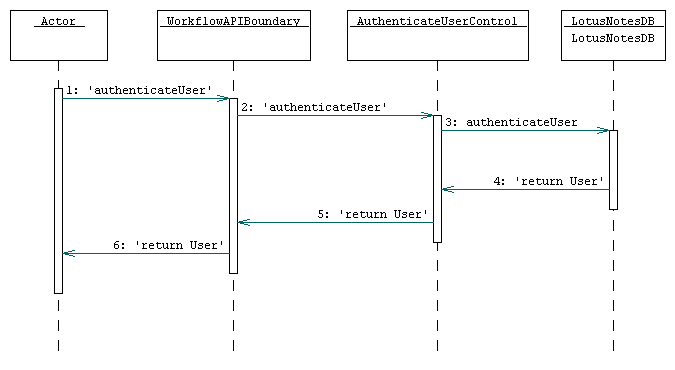
3.5.1.1 AuthenticateUser
John Flyer, an Airman Repairman, walks over to the flight deck terminal with a personal assistant to download the latest work order. He connects the personal assistant to the terminal. The terminal then asks him to prove that he is Bill Teckly by placing his finger on the pad. John realizes he has taken Bill?s personal assistant. After returning from the locker room with his personal assistant, he authenticates himself to the terminal by placing his finger on the pad. After the terminal validates him, the work order is downloaded to his personal assistant.
3.5.1.2 SubmitDocument
Dana a technical manual writer has finished another IETM. She then submits it to the Workflow database, which assigns it a unique ID number. She tells the system that Bob, a quality controller, should be notified. Bob then receives notification that a new IETM has been created for him to look at.
3.5.1.3 UpdateDocument
Jill a quality controller has entered anotations into the most recent IETM. When Bob the technical manual writer in charge of that IETM finished making the appropriate changes, he resubmits the updated document into the Workflow database. The file is transfered to the database and Jill receives notification that the IETM
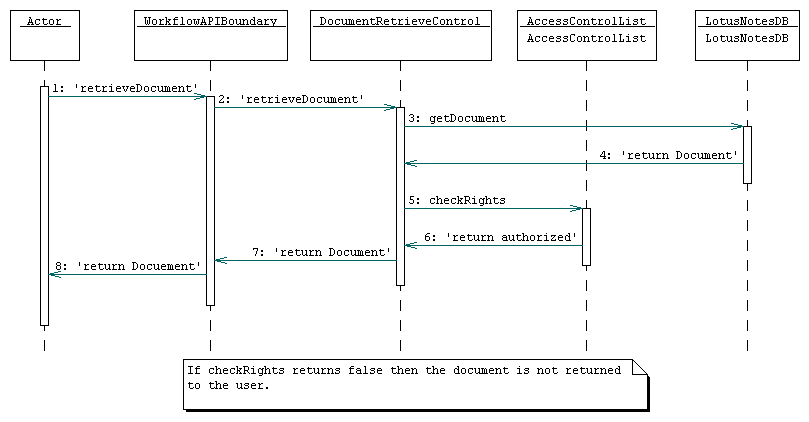
3.5.1.4 RetrieveDocument
Jack, a repairman, is logging into a computer to figure out just what the heck was important enough to wake him up at 5:00am. Knowing that he needs workorder WO12345, Jack enters all relevant information through a repair interface. His computer forwards the request to the workflow subsystem, which updates/verifies pertinent information, and returns the workorder to Jack's computer for display.
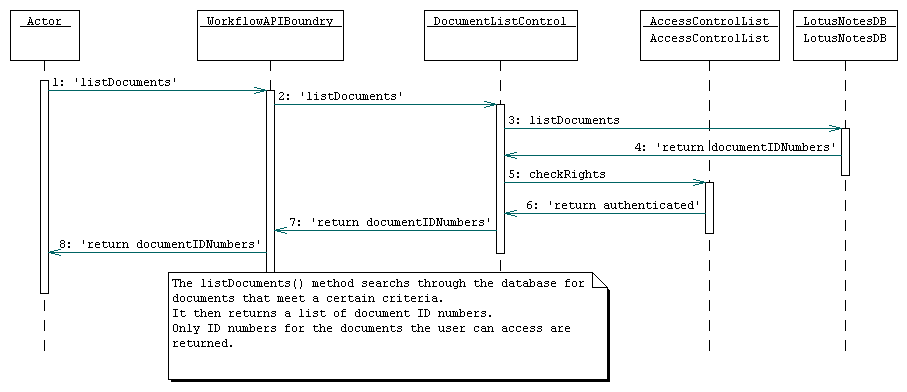
3.5.1.5 ListDocuments
Joe, a Quality Control manager, wants to view all IETMs currently being reviewed by Fred, a QC worker, in preperation to reassigning them to other QC workers, as Fred has won the lottery and quit his job. Having authorized himself, he uses his administrative software to issue a search for IETMs that are being reviewed by Fred. His software issues the request to the Workflow subsystem, receives the list, and presents it to Joe.
3.5.2 Use Cases - Workflow Subsystem
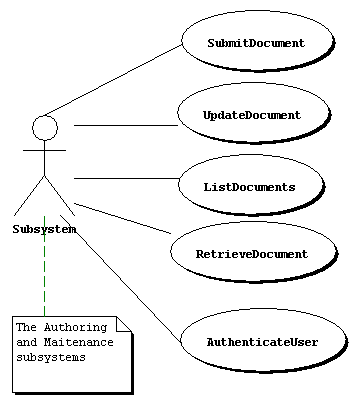
3.5.2.1 AuthenticateUser
Participating Actor:
Authoring, Repair, and Inspection subsystems
Entry condition:
1) A Person tries to access a part of the system that requires a certain security level or that needs to logs who is using the system.
Flow of events:
3) The system takes from the Person information that is unique to the Person.
4) The system checks its records to see if the information uniquely identifies the Person.
Exit condition:
5) The system returns a success or failure depending on ability to uniquely identify the Person.
Special requirements:
none
3.5.2.2 SubmitDocument
Actors:
Authoring, Repair, and Inspection subsystems
Entry:
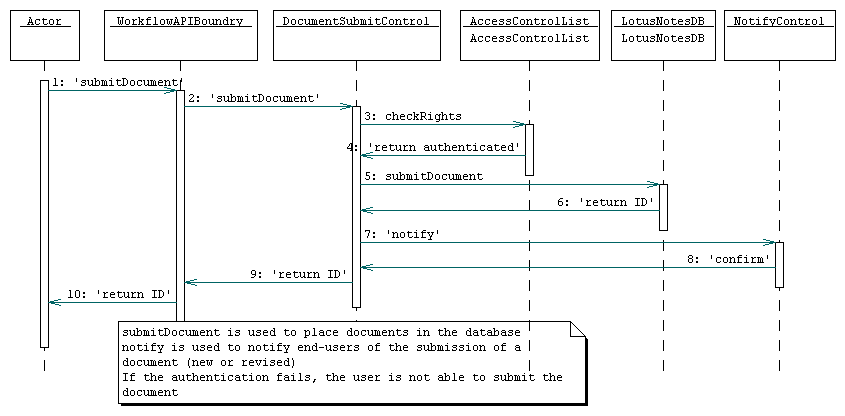
1) A call is made to submit a document that is not already in the Workflow database.
Flow of Events:
2) The user is authenticated.
3) The new document is transfered to the workflow database.
4) The document is assigned a unique ID number
Exit:
5) The appropriate parties are notified about the new document.
Special Requirements:
The notification must be asysnchronous.
3.5.2.3 UpdateDocument
Actors:
Authoring, Repair, and Inspection subsystems
Entry:
1) A call is made to submit a document already in the Workflow database.
Flow of Events:
2) The user is authenticated.
3) The new document is transfered to the workflow database.
4) The new document is assigned a unique ID number.
5) The document currently in the database becomes the previous version of the new document.
Exit:
6) The appropriate parties are notified of the update to the document.
Special Requirements:
The notification must be asysnchronous.
3.5.2.4 RetrieveDocument
Actors:
Inspection, Repair, or Authoring subsystems (it doesn't matter)
Entry condition:
1) Another subsystem requests a document stored in the Workflow susbsystem by ID number.
Flow of events:
2) The user accessing the subsystem is authenticated.
4) The system checks that the specified user and document exist, and that the user can view the chosen document.
5) System returns specified document and its Associated Documents to the actor.
Exit Condition:
6) Desired document is returned to the actor.
Special Requirements:
none
3.5.2.5 ListDocuments
Participating actor:
The Authoring, Inspection, or Repair subsystems
Entry condition:
1) The subsystem needs to get a list of Documents matching a particular set of criteria.
Flow of events:
2. The user accessing the database is authenticated
3. The subsystem makes a request for this list.
4) The Workflow subsystem creates a list of documents matching the uers criteria.
Exit Condition:
5) The list of documents is trasfered to the actor.
Special requirements:
none
3.5.3 Object Models - Workflow Subsystem
3.5.3.1 Data Dictionary - Workflow Subsystem
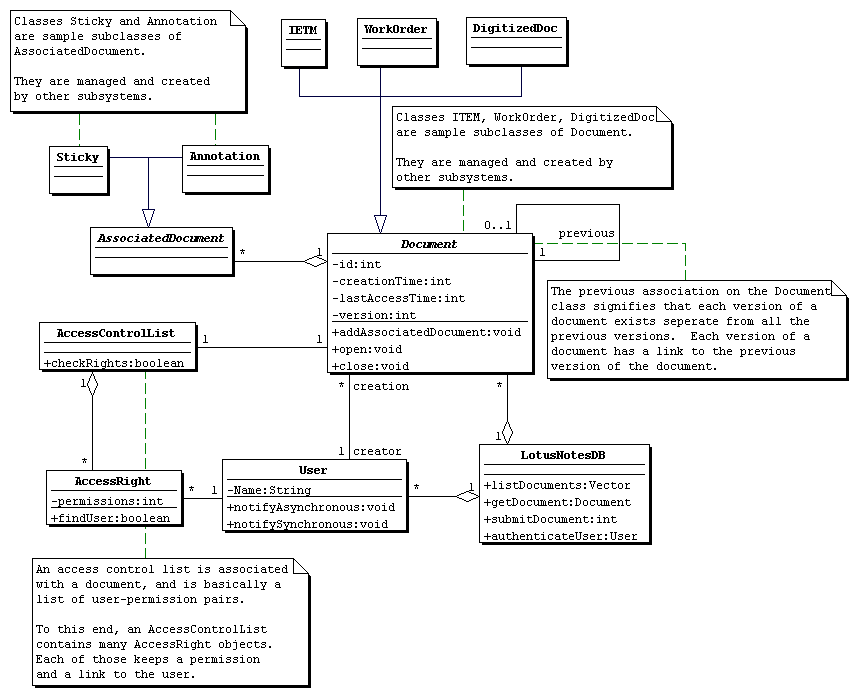
Document
This is a generic item that can be placed in the Workflow database. It consists of an author, some associated documents (like annotations stickies), and a timestamp. IETMs and Workorders are specific types of documents that are defined outside of the Workflow subsystem.
Associated Document
These documents can not be created on their own. They must be part of some regular Document.
Access Control List
This list contains the list of who can read or write a document.
Access Right
This is a right for a particular user. It contains the users name, and what he is allowed to do with the document (read or write).
User
This is a person that is defined to the system by some outside administration. Only users that are in the system may access any documents or be notified of any changes to files in the Workflow subsystem.
3.5.3.2 Class Diagrams - Workflow Subsystem
3.5.4 Dynamic Models - Workflow Subsystem
3.5.4.1 Sequence Diagrams - Workflow Subsystem
3.5.4.1.1 Sequence Diagrams - authenticateUser
3.5.4.1 Sequence Diagrams - submitDocument
3.5.4.1 Sequence Diagrams - updateDocument

3.5.4.1 Sequence Diagrams - listDocuments
3.5.4.1 Sequence Diagrams - retrieveDocument
3.5.4.2 State Charts - Workflow Subsystem
3.5.4.2 Document State Chart

3.5.5 User Interface - Navigational Paths and Screen Mockups - Workflow Subsystem
The Workflow subsystem has no user interface.